
Video Downloader Pro
MobiDevAppsVideo Players & Editors
4.7109.00 Reviews
- Version
- 1.8.9
- Installs
- 10.00K
- Age Rating
- Everyone
Screenshots
Our Review of Video Downloader Pro
 Analysis by Appyee
Offline video access is the whole reason to look closely at Video Downloader Pro. I tested it as an Android video utility rather than treating it like a general editor, and that focus matters: its appeal is not a long list of creative tools, but the simple possibility of preparing videos before I leave a reliable connection. When mobile data is limited, travel is unpredictable, or a favorite clip needs to be available without a signal, that change in timing can be more useful than another streaming app.
The app comes from MobiDevApps and sits in the video players and editors category. It is presented as a paid app at $9.99, carries an Everyone age rating, and its current version is 1.8.9. I would describe it as a practical downloader with offline playback at its center, not as a replacement for a full desktop video editor or a subscription service with its own content library.
Why offline video is the capability that matters
The important distinction is between watching a video when it is available and having it ready when you need it. Streaming is convenient while the connection is strong, but it becomes less dependable on a train, during a flight, in a building with weak reception, or when several people are sharing a network. Video Downloader Pro shifts that decision earlier: I can prepare the material at home and watch it later without making the viewing experience depend on the current signal.
That sounds straightforward, but it changes how I use video. Instead of opening a clip and hoping it loads smoothly, I can think about what I will actually need during the day. A short tutorial can be saved before working in a place with poor coverage. A long-form video can be downloaded when Wi-Fi is available rather than consuming mobile data later. The value is therefore less about novelty and more about control over when the download happens.
I also found that offline playback is most useful when the video is reference material rather than background entertainment. If I am following instructions while away from a desk, repeatedly buffering is distracting. Having the file ready lets me pause, rewind, and continue at my own pace. That makes the app more suitable for planned viewing than for casually browsing an endless stream of new content.
There is a sensible boundary here. Downloading does not automatically make every online video available in the app, and it does not replace the rules of the service where a video is hosted. I would use it for material I am allowed to save and keep the original source and its usage terms in mind. That is not a weakness unique to this app; it is an important part of using any downloader responsibly.
What using it feels like day to day
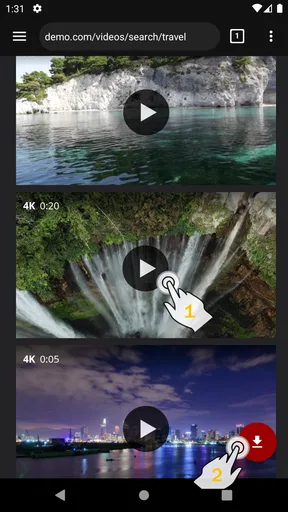
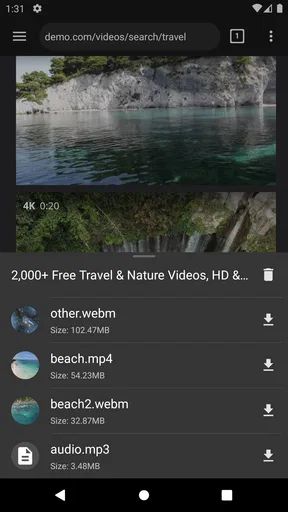
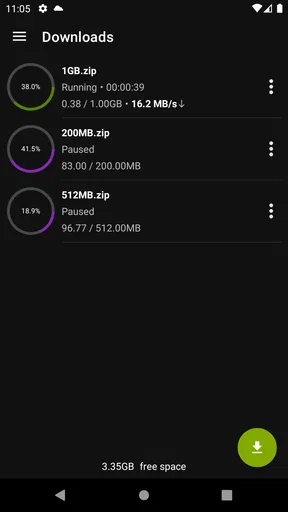
The most useful workflow is to treat the app like a small preparation step. I choose the video while connected to Wi-Fi, start the download, and wait until it is ready before leaving. Later, I open the saved item from the app instead of returning to the original website and risking a slow connection. This approach is less spontaneous than streaming, but it is much calmer when I already know what I want to watch.
I would not download everything indiscriminately. Video files can occupy storage quickly, so I prefer a short queue of items connected to a specific trip, task, or viewing session. After watching, I would remove files I no longer need. This simple habit prevents the offline library from becoming a confusing archive and keeps the app useful rather than turning it into another place to manage clutter.
Another practical tip is to download longer videos individually instead of starting a large batch just before leaving. A single failed or interrupted item is easier to notice and retry than a crowded queue. It also makes it clearer which videos are genuinely important. For someone with limited storage, selecting only the essential clips is a better strategy than trying to build a permanent collection.
The app’s current version, 1.8.9, is relevant for anyone comparing it with older screenshots or recommendations. I would still check that the experience on my own Android device matches my needs before committing to a paid utility. The minimum operating system is Android 7.0, which gives it a broad compatibility range for older supported phones, although performance and available storage can still vary considerably between devices.
A realistic travel and work scenario
Imagine I am preparing for a day of travel with a weak connection expected along the route. The night before, I collect a few videos that I genuinely plan to watch: one instructional clip, one longer presentation, and perhaps something relaxing for the journey. I download them while connected to Wi-Fi, open each saved item briefly to make sure it is available, and then leave without relying on streaming.
That small check is easy to overlook, but it is one of the better habits for this kind of app. A download that appears in a list is not as useful as a file I have actually opened. Confirming the items before departure helps me catch an incomplete transfer or an unexpected storage problem while I still have a connection and time to fix it.
During the journey, the benefit is not just saving data. I can watch at the pace I want without waiting for a page to reload whenever reception changes. If I pause for a conversation or switch briefly to another task, I am not gambling on the video resuming smoothly. For this scenario, the downloader is valuable because it separates preparation from consumption.
The same workflow suits field work, temporary accommodation, and study sessions in places where network access is expensive or unreliable. I would be more cautious about using it for a constantly changing news feed or live event, where an offline copy quickly becomes less relevant. The capability is strongest when the video remains useful after it has been saved.
Where the convenience has limits
The first trade-off is the upfront price. At $9.99, this is not a throwaway installation, so I would not recommend it to someone who only occasionally watches a single short clip online. A free streaming option may be perfectly adequate for that person. The paid model makes more sense when offline access is a recurring need and avoiding repeated buffering or mobile-data use has real value.
Storage is the second trade-off. A downloader can make video access more reliable, but it cannot make large files physically small unless the app offers a choice that suits the source and the device. I would keep an eye on available space, especially on an older phone. The practical solution is a rotating library: download for the upcoming need, watch, and clear what has served its purpose.
There is also a difference between downloading and organizing. Saving a video is only half the job; finding it later matters just as much. I would use clear names or a simple personal routine for separating travel material from work references. If someone expects a sophisticated media-management system, this focused utility may feel less complete than a broader player or a file manager built around collections.
Privacy and account expectations are another reason to think before buying. I would review the app’s behavior on my device and avoid granting access that does not make sense for my intended workflow. More importantly, I would not assume that an offline copy has the same rights as the original online viewing experience. The safest approach is to save content for personal, permitted use and avoid treating the app as a way around access restrictions.
Finally, offline viewing is not the same as permanent ownership. A saved file is useful for a trip or a short project, but it may not remain relevant forever. If the original content changes, disappears, or is updated, the local copy may become outdated. That is why I see this app as a preparation tool, not as a long-term preservation system.
How it compares with the usual alternatives
The most obvious alternative is simply streaming in the original video service. Streaming wins for discovery, freshness, and minimal preparation. If I am browsing casually or watching something that changes frequently, I would rather open the service directly. Video Downloader Pro wins when the connection is the problem and I already know what I want to watch.
Some services include their own official offline mode, often tied to an account or subscription. That option can be smoother because downloads stay inside the service and may integrate with its library. On the other hand, a dedicated downloader can be appealing when I want a separate place for saved videos rather than another service-specific collection. The better choice depends on whether convenience within one platform matters more than having a focused offline tool.
A general file manager can also handle downloaded media, but it usually does not make video access its central purpose. I prefer a dedicated app when I want a straightforward route from saving a clip to playing it later. I would choose a broader file manager instead if I routinely manage many file types, move content between folders, or need detailed storage controls.
Desktop software remains preferable for serious editing, conversion, or large-scale organization. The category label includes video players and editors, but I would not buy this app expecting a timeline, advanced effects, or professional production controls. Its strength is the offline viewing workflow. That narrow purpose is a benefit for the right user and a reason to skip it for anyone looking for a complete editing suite.
Who will get the most from it
I think the best match is someone who regularly watches known videos away from dependable Wi-Fi. Travelers, students using saved instructional material, commuters, and people with strict mobile-data limits can all understand the benefit quickly. The app is also a sensible option for anyone who dislikes being forced to make viewing decisions in real time, when a weak signal can interrupt the experience.
It is less convincing for a person who mainly discovers videos through recommendations, watches live content, or already has a trusted official offline feature in a service they use every day. That user may gain little from paying for a separate downloader. I would also hesitate to recommend it to someone with very limited storage unless they are willing to maintain a small, temporary library.
The app has attracted a 4.7 average from around 974 ratings, with over 10 thousand installs, which suggests that its focused purpose is resonating with a real group of users. I would read that as encouragement rather than a guarantee: the experience still depends on the sources I use, my phone’s storage, and whether my viewing habits actually benefit from preparation.
Its Everyone rating makes the app broadly approachable from an age-classification perspective, but that does not decide whether every downloaded video is suitable for every viewer. I would judge the content separately and use the tool with the same care I would apply to any media saved on a shared device.
My recommendation after using it
The real advantage is dependable access at the moment I need it, not simply the act of downloading. Video Downloader Pro makes sense when I can plan my viewing and want to move the network-dependent part of the process to an earlier, more convenient time. The strongest results come from a disciplined workflow: use Wi-Fi, save only permitted content, verify important downloads, and clear old files after the trip or task.
I would recommend it to a friend who often says, “I wish I had saved that before leaving.” The $9.99 cost is harder to justify for occasional viewers, and people seeking advanced editing or a constantly updated content library should choose a different kind of app. For my use, though, the focused design is its point: it turns offline video from a last-minute hope into something I can prepare deliberately.
After being released on November 2, 2021, the app has remained centered on that practical idea rather than trying to become everything at once. That makes my final opinion fairly clear. If your problem is unreliable access to videos you already intend to watch, Video Downloader Pro is worth considering. If your problem is finding, editing, or managing media at a professional level, I would spend the money elsewhere.
Verdict
Strengths of Video Downloader Pro
- Supports downloading videos for offline viewing.
- Simple interface makes saving content quick and easy.
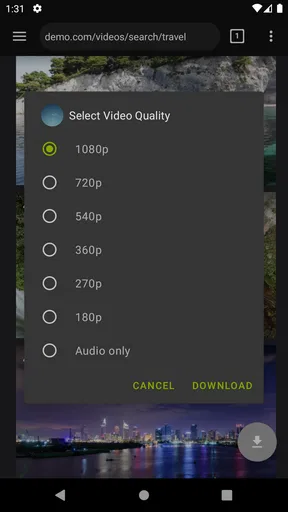
- Offers multiple download quality options.
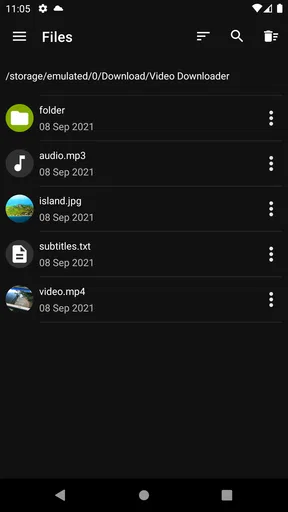
- Built-in file management keeps saved videos organized.
- Works without requiring a constant internet connection.
Limitations of Video Downloader Pro
- May not support downloads from every video platform.
- Downloaded files can use significant device storage.
- Some features may be restricted behind ads or purchases.
- Download speeds depend heavily on your connection.
- Copyright restrictions may limit how saved videos can be used.
Similar Picks in This Category
View All
Google TV
Google LLC3.9

iTunes
Apple4.7

YouTube
Google LLC3.8

MX Player
Amazon Mobile LLC4.2

CapCut - Video Editor
Bytedance Pte. Ltd.3.5

PLAYit-All in One Video Player
PLAYIT TECHNOLOGY PTE. LTD.4.5
Frequently Asked Questions
What is Video Downloader Pro and what can I use it for?
Video Downloader Pro is designed to help users save online videos for later viewing, depending on the supported websites and the app’s available features. It may include options for choosing video quality, managing downloads, and organizing saved files. Before downloading, check the app’s current compatibility list, because not every platform or video service may be supported.
Is Video Downloader Pro free to download and use?
The application may be available as a free download, but some features can be limited by advertisements, in-app purchases, subscriptions, or usage restrictions. Premium options may unlock faster downloads, remove advertising, provide additional quality choices, or enable extra management tools. We recommend reviewing the store listing carefully so you understand the pricing and trial conditions before confirming any purchase.
How do I download videos with Video Downloader Pro?
In normal use, you typically copy a video link from a supported website or use the app’s built-in browsing or sharing option, then paste or send the link to Video Downloader Pro. The app should analyze the address and display available formats or resolutions. Choose the preferred option and start the download, while remembering that menus and supported steps may vary by device version.
Where are downloaded videos stored, and can I watch them offline?
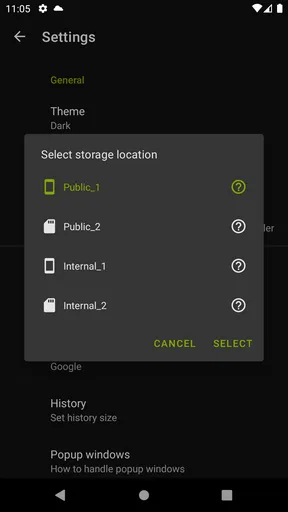
Downloaded videos are generally saved inside the app’s download folder or in a location selected through the application’s storage settings. Some versions may allow files to be moved to the device gallery or another folder, while others keep them inside the app for playback. Once the download is complete, offline viewing should be possible, provided the file remains accessible and playable.
Is it legal and safe to download videos using Video Downloader Pro?
The safety of the application depends on obtaining it from an official app store and checking the permissions it requests. Legally, downloading content is only appropriate when you have permission, the platform allows it, or the material is offered for offline use. Avoid saving copyrighted videos without authorization, and be cautious with suspicious links, excessive permissions, and unofficial versions of the app.
